Watower
See what's really using your Mac's memory, CPU and disk, and get space back safely.
Activity Monitor with a warm, plain-English UI. Find out what's filling your disk, what "System Data" really is, and which git worktrees you can safely delete. Nothing ever leaves your Mac.
macOS
Version 1.2 · macOS 14 or later · Apple silicon · Signed with Developer ID and notarized by Apple.

"System Data", explained.
Your disk broken down like System Settings → Storage, with System Data split into every piece: caches, app data, developer and AI-model caches, hidden tool folders, temp files, logs, swap, Time Machine snapshots. Each piece has its size, Show in Finder and a recoverable Move to Trash for eligible items.
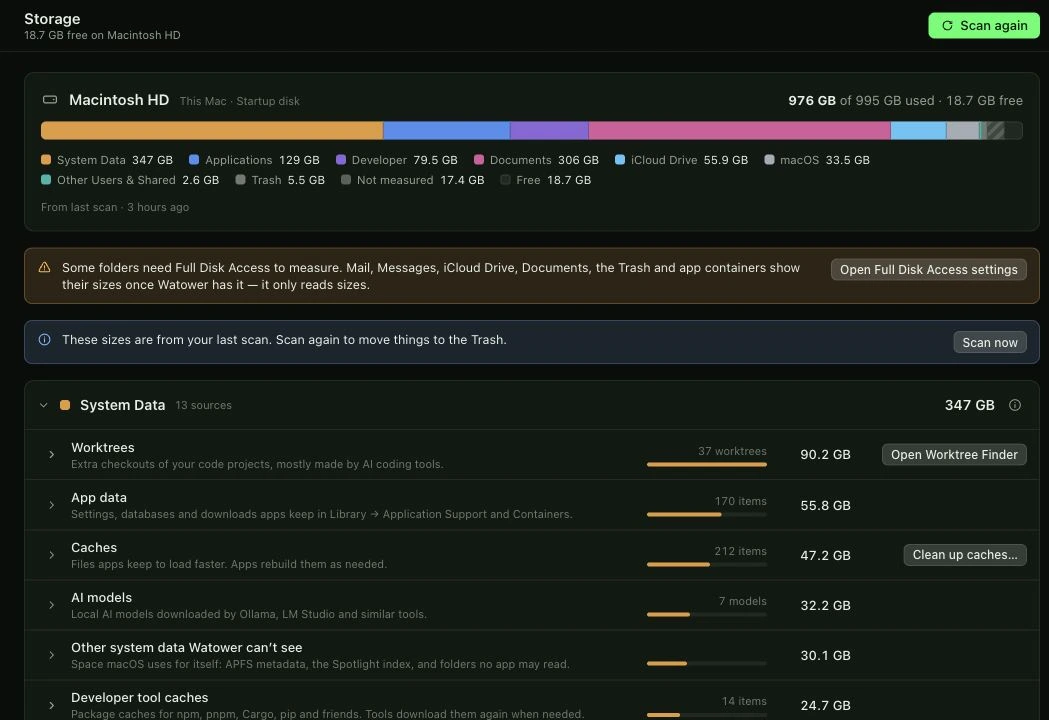
Scans start when you choose Scan. Protected and unmeasured space stays visible in the breakdown; Full Disk Access is optional.
Worktree Finder.
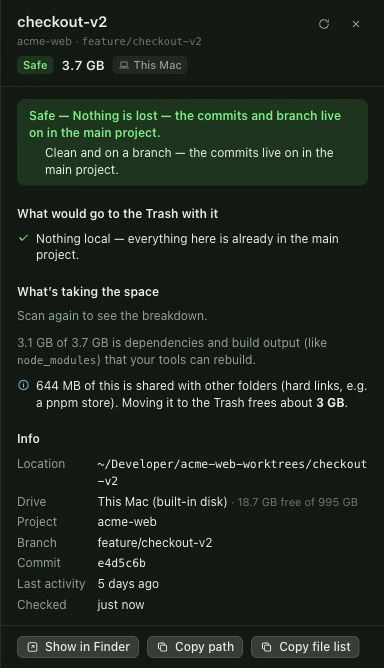
AI coding tools leave dozens of git worktrees behind. Watower finds them in the folders you choose and known AI-tool folders across your drives, shows what each one costs, and tells you which are Safe to remove, need a look (Caution, with the exact local files listed), or must stay (Blocked).
- Safe
- Clean and on a branch. Commits and branches stay in the main project.
- Caution
- Review the exact local files and give extra approval before a Trash move.
- Blocked
- A protected or invalid worktree must stay. Watower refuses the move.

Top apps you can act on.
Which apps use the most CPU, memory and disk, with helpers folded into the app. Click one for details, Show in Finder, Activity Monitor or a polite Quit.
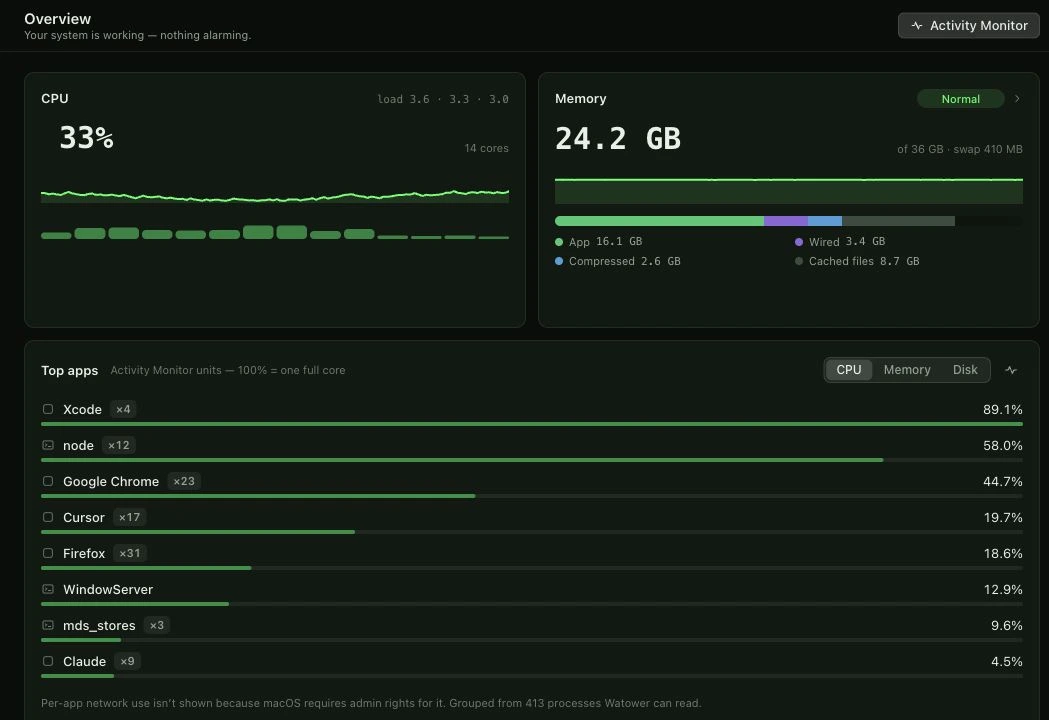
Memory, in plain English.
App memory, wired, compressed, cached files and swap: what each means and when it's a problem.
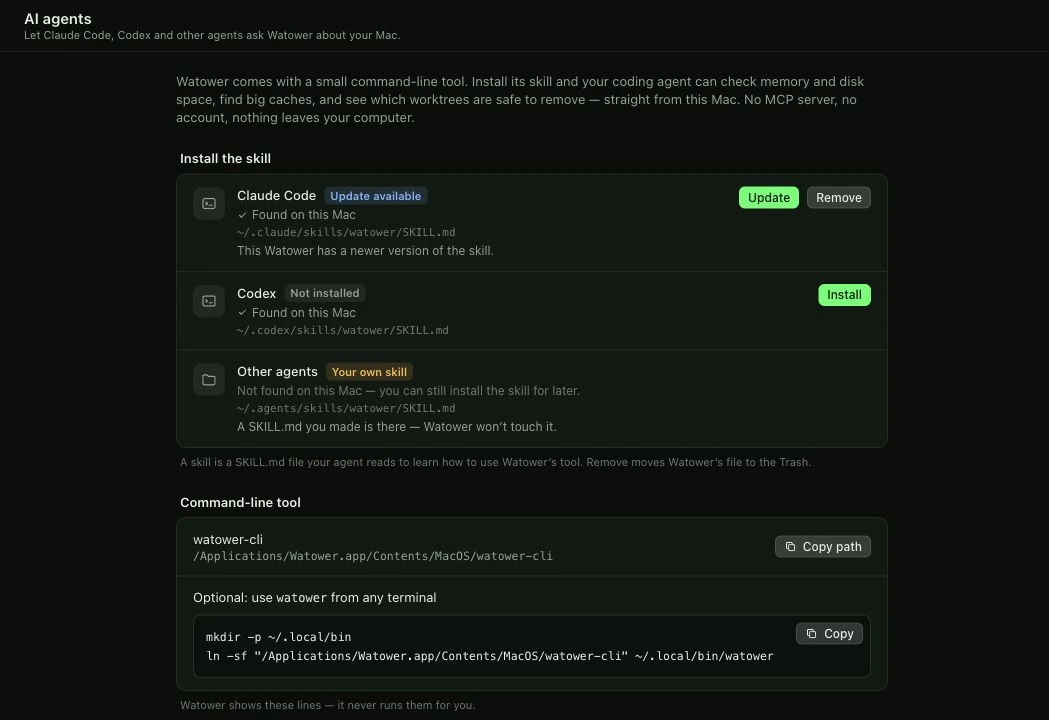
Works with your AI agent.
A built-in command-line tool plus a one-click skill for Claude Code and Codex. Your agent can find space hogs and clean up worktrees with you, locally, with no MCP server.
The CLI is read-only by default. Worktree Trash moves are dry runs until you approve them. Your coding agent is a separate tool; review its provider settings before sharing private output.
Desktop widgets.
Small, medium and large widgets that lead with what matters right now. Add Watower through Edit Widgets on your Mac.
Your Mac. Your data. Your choice.
No account, no telemetry, no network requests in Watower 1.2.
Never a permanent delete: everything Watower removes goes to the Trash, with a local receipt.
Storage scans read sizes, not document contents. Worktree safety checks can read files to compare them with Git’s index. Nothing is sent.
It stays out of protected folders unless you grant Full Disk Access. Open source under GNU GPL version 3 only (GPL-3.0-only). The source of every release is attached to it.
Download for Mac
Version 1.2 · macOS 14 or later · Apple silicon · Signed with Developer ID and notarized by Apple.
Drag to Applications
- Open the downloaded disk image.
- Drag Watower to Applications.
- Wait for copying to finish, then eject the disk image.
- Open Watower from Applications.
Release notes / checksums · Matching source
GNU GPLv3 license · License scope · Corresponding-source guide
The GitHub repository hosts releases and licensing. Use the matching app source archive above; GitHub’s automatic source downloads contain the hosting repository.
Verify the download
Compare the SHA-256 of your file with the values below or the attached checksum file.
SHA256SUMS.txt- DMG SHA-256
- 9c03d0dd9c1dd40f3a32820ace59c25c7db1dd6a5a8a97fbf33404ccc6844bed
- ZIP SHA-256
- 7379b534208309d5c8da9171901bc4344068272e37647ea64eb83683b0e9096d
- Matching source SHA-256
- 7958335e13de0c08c8c6d3ad5eabffacfa0bd9dfe4418423f243ebf3ab1c9346
- Source commit
- 9d81885cd0fb809c05502b3b65dce34e36373b41
Watower 1.1: additional GPL grant
IA COMPA LLC also grants GPL-3.0-only permissions for its first-party Watower 1.1 material. Existing copies retain their original MIT notices and permissions. Original tags, archives, signatures and checksums remain unchanged. Third-party material keeps its original terms.
Read the additional grant · 1.1 GPL source supplement · Original 1.1 source archive
The supplement adds matching dependency sources, notices, rebuild information and the additional grant. It preserves the original MIT license rather than replacing the original archive.
Source supplement SHA-256
3e75ce647f903d0c9d3181dccdd859a06978c0d8e956529f74dc7a2d295195c2
More from IA Compa
 DawnamiteGive your next sound room to grow.
 BituabitBit by bit, never back to zero.
 TextiacPrivate messages. No accounts to create.
 SicnoteWrite songs that rhyme, on-device.
 SonediaA multitrack studio in your pocket.
 Theme4LogicFree, open-source color themes for Logic Pro.
 VibiacYour agents, in parallel. Your repo, never in chaos.
 WasThatHeard a sound? Find the app behind it.
 ClinkClean links. Never broken ones.
Building something like this?
We build our own apps end to end — and we build them for clients, too. If you have an app idea, let's talk.