Sound & mix
Mixer & signal flow
Balance tracks, use sends and keep the output under control.
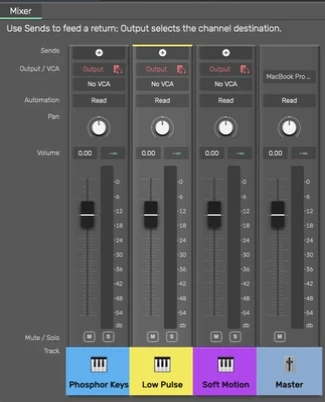
Open the mixer
Click Mixer in the header or press M. The mixer opens below the arrangement. Its expand control gives it more room; restore it to return to the dock. Click a channel name to select the same track used in the arrangement.
Identify a channel
Each channel has a bordered strip and a compact colored nameplate at the bottom, with the icon beside the name. Faders shrink with the panel; at very short heights the controls scroll vertically so the nameplate and controls remain reachable. The color follows the track color, including Master. Click the name or icon to select it; the selected strip has a brighter neutral body and a colored top edge. The main controls keep their neutral background.
Double-click a channel name to rename it. To recolor the selected track, use Option+C and choose a palette color. The arrangement header and mixer identity update together. Command+Z undoes the color change.
Build a balance
- Start with track levels low enough to avoid clipping.
- Bring up the main element, then add supporting tracks.
- Use pan to place sounds across the stereo field.
- Check soloed details, then turn Solo off and judge them in the full mix.
- Watch the Master meter and leave room for later processing.
The numbered track activator and 0 on a selected arrangement track mute the track. Solo changes which tracks you hear; it is not a way to permanently remove tracks from an export.
Current sends operate before the channel fader. Lowering a source fader can leave its send audible. No Output removes the direct route while retaining sends. Trace the route when a supposedly quiet track still produces sound.
Groups and VCA
Groups help organize related tracks and route them together. A VCA controls linked levels; it is different from summing audio through an effect bus. Use the available group/VCA commands deliberately and review the resulting channel relationships.
Master and Preview
Master controls the main mix. Preview volume controls Library sample auditions separately and does not change the exported mix. Input monitoring, return effects and generated instruments can still produce sound when an ordinary region is stopped or muted.
Guide for the macOS development build. For changes between versions, see update history. Public installers and final system requirements are not available yet.